PDF · IMAGE · POWERPOINT
Edit slides an AI image model drew, without regenerating them
Image models such as Nano Banana (Gemini) and ChatGPT's image generation can draw a finished-looking slide, but every word on it is part of the picture. Asking the model to fix one typo usually redraws the whole slide differently. ReDeck rebuilds the detected words as editable PowerPoint text boxes on the image you already like, so you change only the text.
Why can't I fix the text on an AI-generated slide?
An image model returns pixels, not a presentation. The title, bullets, and labels you see were painted into the image, so PowerPoint can only select the whole picture. There is no text layer underneath to correct.
Re-prompting is the other option, but the model draws a new image each time: fixing one misspelled word can also move the layout, change the illustration, or introduce a new error elsewhere. When the design is already right, it is usually faster to keep the image and replace only the words.
Which tools produce image-only slides?
| Where the slide came from | What you get | What to do |
|---|---|---|
| Nano Banana in the Gemini app or another Gemini image tool | A PNG image, 16:9 at 1376×768 (1K), 2752×1536 (2K), or 5504×3072 (4K) | Convert the image or a PDF of several images |
| ChatGPT image generation or another GPT image model | A PNG image; the standard landscape size is 1536×1024 (3:2) unless you asked for another size | Convert it; the slide keeps the image's 3:2 shape |
| Gemini Notebook (NotebookLM) slide deck | Slides drawn with Nano Banana Pro; exported as PDF or PowerPoint | Check the PowerPoint export first, then see the NotebookLM guide |
| A deck tool that exports text boxes | Editable text already | Edit the exported file directly — no conversion needed |
How do I turn several generated images into one editable deck?
- Download each slide at the largest size the tool offers. Small text recovers more accurately from a sharper image.
- If you have several slides, combine them into one PDF in slide order (for example, select the images and print to PDF). ReDeck converts one file per job, and a PDF keeps the deck together.
- If an image is WebP, save it as PNG or JPG first; ReDeck accepts PDF, PNG, JPEG, BMP, GIF, and TIFF.
- Upload the file, select the pages, and download the .pptx. The slide size follows your image, so a 3:2 image gives a 3:2 slide.
- In PowerPoint, correct the wording, then compare every slide with the image you approved.
What to check in AI-generated text
ReDeck recovers the words that are drawn on the image, including the model's mistakes. A misspelled name, an invented number, or garbled lettering comes back as editable text exactly as it was drawn, which is what lets you correct it — but conversion does not fact-check the content.
- Names, figures, dates, and units the model may have invented or misspelled
- Letters that look plausible but are not real words, especially in small labels
- Line breaks and text that overflows after you replace a word with a longer one
- Fonts: the model drew lettering, not a font, so ReDeck chooses an approximate system font
What stays a picture
Ordinary text becomes editable text boxes. Supported graphics are separated into movable pictures on a repaired background. Decorative lettering that is part of the artwork, text inside a photo-like scene, and detailed illustrations stay as pixels so the slide still looks the way the model drew it. Charts and tables are not rebuilt with editable data.
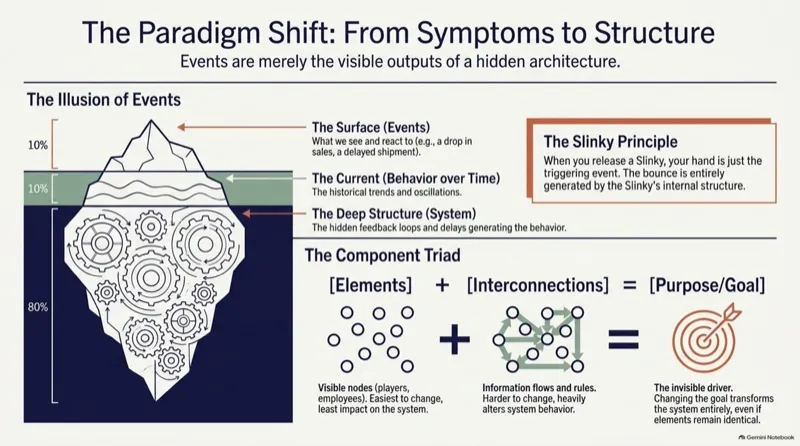
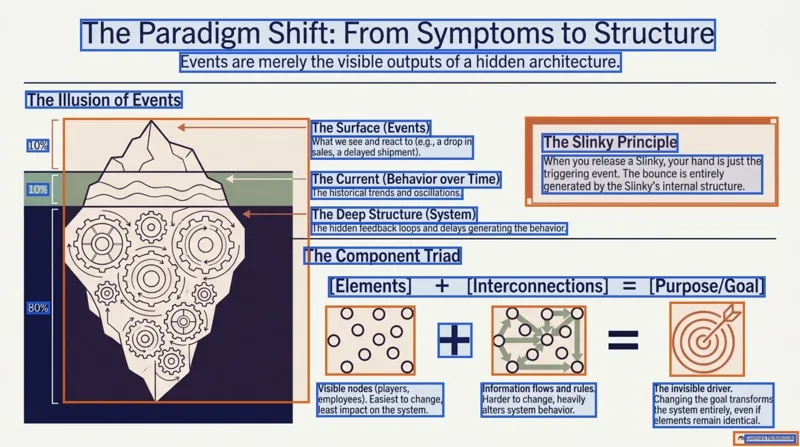
Gemini Notebook slide decks are drawn with Nano Banana Pro, and our public samples are 1376×768, the 16:9 size Google lists for its 1K output. On slide 1 of the 5-slide Systems Thinking sample, ReDeck recovers 21 editable text boxes and 6 separated visuals — 106 text boxes and 31 visuals across the deck.
Inspect the Systems Thinking conversionCompare more real conversions
When ReDeck is not the right tool
- You only have a prompt or an outline, not a slide yet. ReDeck does not generate or redesign slides.
- You want a different layout or illustration. Regenerate it in the image tool, then convert the version you keep.
- Your tool can export real text boxes (PowerPoint or Google Slides). Use that export.
- You need charts with editable data. Rebuild them from the data in PowerPoint.
FAQ
Can ReDeck fix the typos the image model made?
It turns the drawn words into editable text, including the misspelled ones. You then correct them in PowerPoint yourself; ReDeck does not rewrite or spell-check the content.
Does it work with slides from Midjourney, Ideogram, or other image tools?
Yes, when the slide is a PDF or a PNG, JPEG, BMP, GIF, or TIFF image. The source tool does not matter; image sharpness and how small the text is do.
Will the slide be 16:9?
The slide keeps the proportions of your image. A 16:9 Nano Banana image gives a 16:9 slide; a 1536×1024 image gives a 3:2 slide.
Is ReDeck affiliated with Google or OpenAI?
No. ReDeck is an independent conversion service. Nano Banana, Gemini, and Gemini Notebook are Google products; ChatGPT is an OpenAI product.
Sources
Related guides
ReDeck is independent from Google, Microsoft, and Apple.