PDF · IMAGE · POWERPOINT
An AI agent and ReDeck: one slide conversion compared
Need to change a caption in an illustrated PDF slide while keeping its design? We compared the original Systems Thinking page with a supplied agent-created PowerPoint and a saved ReDeck conversion. Both outputs contain editable text. In these files, the agent redraws the illustration, while ReDeck retains the source artwork as pictures. The comparison below shows what that means for the edits you need to make.
The task: recover page 1 without redesigning it
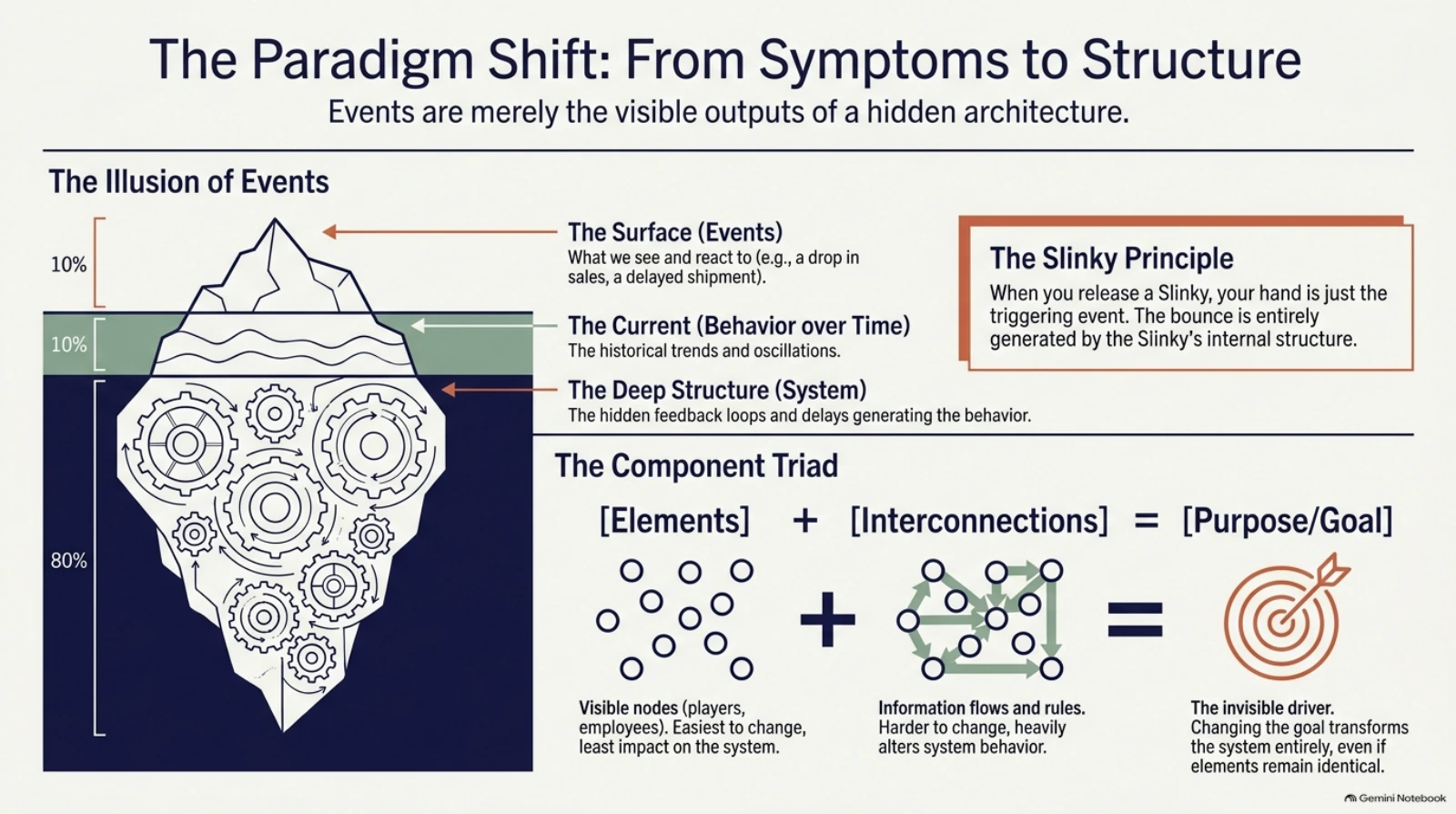
The source is page 1 of the five-page Systems Thinking PDF: an iceberg filled with gears, three levels of explanation, a Slinky callout, and a component diagram. The task is to make its text editable while retaining the illustration and layout. Creating a fresh presentation about systems thinking is a different task.
ReDeck prepared this case study about its own product using a supplied agent output and an existing showcase conversion. The original PDF page appears beside both outputs below, at the same scale. The purpose is to help you judge whether a reconstruction fits an editing task that needs to preserve an existing design.
Inspect the Systems Thinking showcase and download its files
Original PDF vs agent vs ReDeck
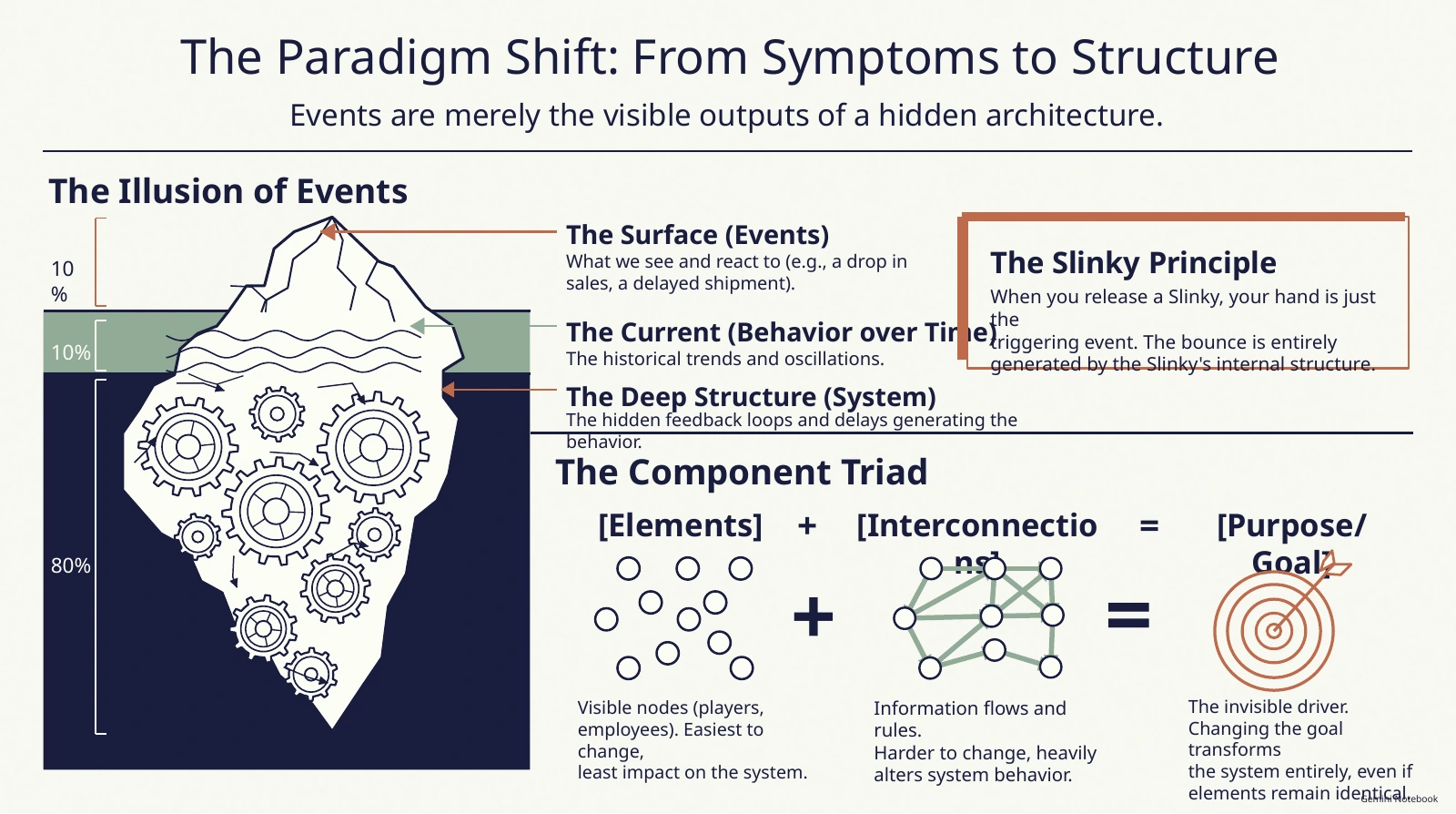
The agent recovered much of the wording and built editable objects. It also recreated the iceberg and diagram with visibly different geometry. In this render, some labels wrap into the diagram and several text blocks extend beyond their intended space.
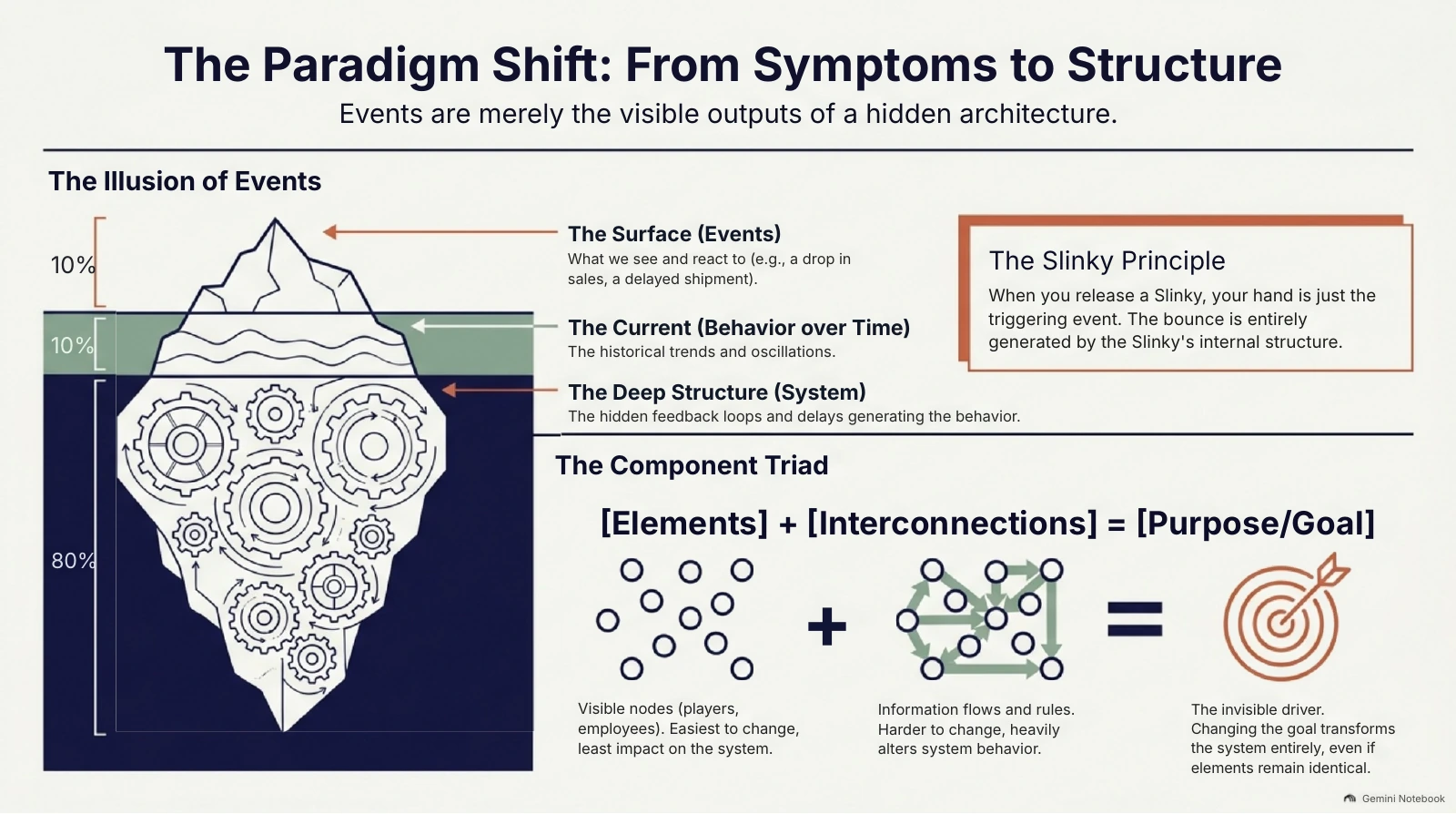
ReDeck retains the original iceberg, gears, network arrows, and target as visual artwork. Its text is recovered into PowerPoint text boxes. This preserves more of the source composition, although the font weight, text spacing, and some visual edges still differ from the PDF.
Three differences to inspect
The numbered marks below identify areas of the actual agent render. The artwork underneath the annotations has not been redrawn or retouched.
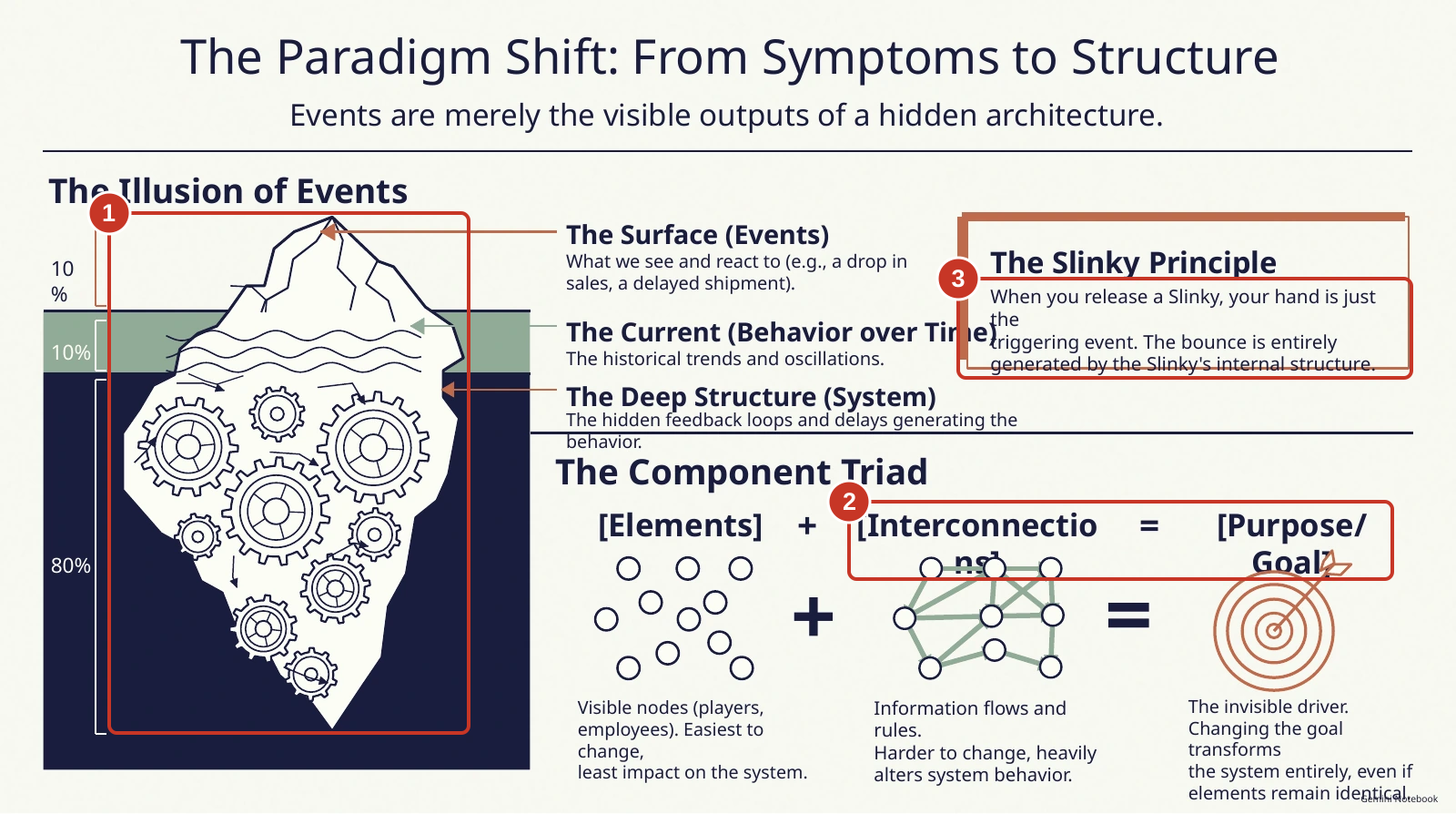
- 1. Artwork fidelity: the iceberg outline, gear shapes, and their arrangement change. The network arrows and target are also simplified. ReDeck keeps these illustrations as pictures, so preserving their appearance does not require drawing them again.
- 2. Label layout: [Interconnections] breaks across lines in the agent render, and [Purpose/Goal] wraps above the target. ReDeck keeps the component labels on one line in this example. Lower captions in the agent render also run close to or beyond the slide edge.
- 3. Text fit: the Slinky paragraph extends beyond the callout's lower border in the agent render. The long behavior heading also reaches into the callout area. ReDeck's corresponding text fits within those areas in this render.
How we compared the files, and what the timing means
We inspected page 1 of the source PDF, the supplied one-page agent PPTX, and page 1 of the saved ReDeck showcase PPTX. Both PowerPoint files were exported through LibreOffice 26.8.1.1, and all three page images were rendered at 1600 pixels wide. Neither output was repaired before comparison. The numbered overlays only mark areas to inspect.
We also counted text-bearing shapes in each PowerPoint file: 26 in the agent result and 21 in ReDeck's page 1. Different text-box boundaries can produce different counts; more boxes do not establish better recovery or visual fidelity.
The ChatGPT conversation shows the prompt "turn page 1 into editable pptx" with Systems_Thinking.pdf attached. Its response says the iceberg, gears, arrows, network, and target were redrawn as native PowerPoint shapes. The run owner identified the model as GPT-6 with High thinking. These are delivered-file observations from one example; results can vary with the prompt, tools, and source deck.
ChatGPT displays "Worked for 5m 52s" for this response. That is the elapsed work time shown by the application; we did not independently stopwatch the run, and there is no matched ReDeck runtime. Cleanup time was not measured. For your own deck, also allow time to compare the artwork, fix text fit, and check the file in the application where you will edit it.
Why direct reconstruction is a difficult conversion task
An image-based PDF page contains the appearance of a slide without the original PowerPoint text boxes and drawing objects. Reading its words is only one part of recovery. A conversion also has to fit the words into the right locations, handle line breaks, preserve artwork, and restore the areas behind recovered objects.
An agent can create text boxes and drawing objects, but the file still needs to be checked against the source. This supplied result is a recognizable reconstruction with changed illustration details. We cannot attribute those changes to a particular model or implementation from the delivered file alone.
ReDeck is built around recovering an existing slide: detected text becomes editable text boxes, supported simple shapes can become native shapes, and separated visuals become movable pictures. Detailed artwork can stay grouped or in the background. Keeping the artwork as artwork helps preserve details that a redraw would have to recreate.
| Check | Supplied agent output | Saved ReDeck output |
|---|---|---|
| Editable text | 26 text-bearing PowerPoint shapes | 21 editable text boxes |
| Illustration | Iceberg and diagrams visibly reconstructed | Source illustration retained as visual artwork |
| Component labels in this render | Interconnections and Purpose/Goal wrap | Component labels stay on one line |
| Slinky paragraph in this render | Extends below the callout border | Fits inside the callout |
| Displayed work time | 5 min 52 sec, shown in the ChatGPT conversation | No matched runtime recorded for this comparison |
Try the edit you need before converting the whole deck
On this showcase's first page, ReDeck recovers 21 editable text boxes and six separated visual objects. The visuals remain pictures: moving an illustration does not mean you can edit every gear or arrow within it. Charts and tables can also remain pictures, and font matching and background repair still need review.
- Upload the original PDF or a clear slide image to ReDeck and select a representative page. If all you have is an image-based PowerPoint, export it as PDF first.
- Inspect the converted page against the source, especially detailed artwork, short labels, numbers, and text near the slide edges.
- Download the .pptx and try the actual edit you need in PowerPoint, such as changing the title or correcting a caption.
- Review text fit and visual differences before converting the rest of the deck or sharing the edited presentation.
Try the Systems Thinking conversionConvert your PDF or slide image
When an agent or the original file is enough
If you have the editable source presentation, edit that file directly. If you want to summarize research, rewrite the story, or create a new slide design, an agent can help with that task. A rough reconstruction may also be sufficient when the wording matters more than the illustration.
ReDeck is useful when the only source is a PDF or image and you want to recover editable content while keeping the existing slide recognizable. It does not promise pixel-perfect output or turn every illustrated component into a native PowerPoint drawing.
Run details
- Agent/app: ChatGPT.
- Model: GPT-6. Thinking level: High. These settings were supplied by the run owner.
- Input: Systems_Thinking.pdf, page 1. Prompt: "turn page 1 into editable pptx".
- Displayed work time: 5 min 52 sec ("Worked for 5m 52s" in the conversation).
- Review date: November 10, 2026. The app, prompt, displayed time, and reconstruction description were checked in the existing conversation. The internal toolchain and complete retry history were not independently audited.
- Scope: one delivered result compared with one saved ReDeck conversion; no repeated trials or matched speed test.
FAQ
Can an AI agent convert a PDF to editable PowerPoint?
An agent can produce a .pptx with editable text and shapes. In the supplied file, we found editable text alongside changed artwork and text-fit problems in a LibreOffice render. You need to inspect the delivered result to know whether it preserves the design well enough for your task.
Why use ReDeck if an agent can create PowerPoint files?
Creating a new slide and recovering an existing illustrated slide have different goals. ReDeck focuses on recovering text and supported objects while retaining the source artwork and layout. Inspect a representative page to decide whether its output meets your editing needs.
Does this prove ReDeck is faster than every agent?
No. ChatGPT shows 5 min 52 sec of work for this response. There is no matched ReDeck timing in this comparison, so it does not establish a general speed ranking.
Will every graphic become a native editable shape?
No. ReDeck can recover supported simple shapes, but illustrations can remain movable pictures, grouped artwork, or part of the background. Charts and tables can remain pictures without editable data or cells.
Downloads
Related guides
ReDeck is independent from Google and Microsoft.