PDF · IMAGE · POWERPOINT
Convert a PDF to editable PowerPoint
ReDeck converts a PDF into an editable .pptx: recognized text is recreated as editable PowerPoint text boxes, and some graphics can be moved independently while complex artwork stays on the original background. How well that works depends on which kind of PDF you have — native, scanned, or flattened — because different PDFs store text and images differently.
Why different PDFs produce different conversion results
Before converting anything, it helps to know which of these you actually have:
| PDF type | What is stored inside | Ordinary PDF→PPTX converter | ReDeck reconstruction (.pptx) |
|---|---|---|---|
| Native vector PDF (exported from slides or documents) | Real vector text runs and embedded font declarations | Pulls out text runs, but often splits paragraphs into single lines and drops graphic alignment | Preserves declared font names, combines lines into editable text boxes, and positions separated visuals |
| Scanned PDF (photographed or scanned printed pages) | A single raster image of the page — no embedded text layer | Places the page picture onto a slide; clicking any word selects the whole page image | Detects text from pixels into editable text boxes with approximate system fonts and cleans the background |
| Flattened slide PDF (AI exports, Canva/NotebookLM, or re-saved slides) | Looks like finished slides, but content is flattened into a single image | Changes container format without recovering objects; the slide remains a flat picture | Reconstructs recognized text boxes (106 in our 5-page test), separates movable graphics, and repairs background |
A format change isn't the same as editability
Microsoft's own guidance for inserting a PDF into PowerPoint describes the common outcome plainly: the PDF lands on the slide as a picture or an embedded object, not as native text and shapes. That gap is what ReDeck closes. Once a PDF's pages are uploaded, the words on each page are detected and rebuilt as PowerPoint text boxes, and each page's graphics are separated into their own movable picture objects on the preserved background.
In verified benchmarks on public decks, the 5-page Systems Thinking PDF converts into 106 editable PowerPoint text boxes and 31 separated visual objects (with 21 text boxes on slide 1 alone), while the 13-page Resilient Botanical Blueprint PDF yields 190 editable text boxes and 76 separated visuals.
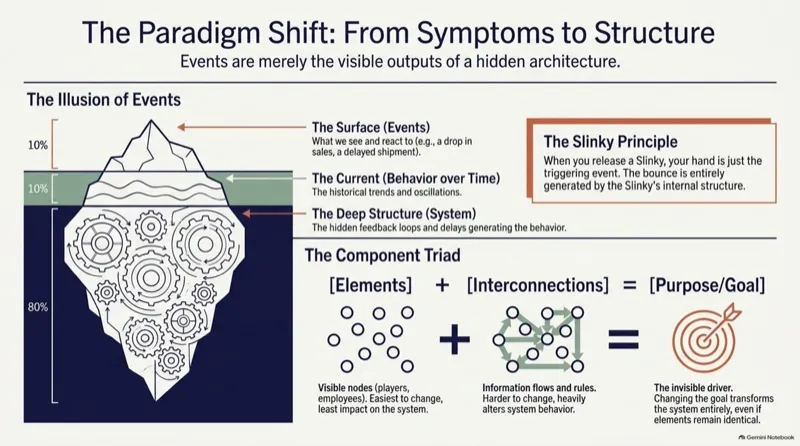
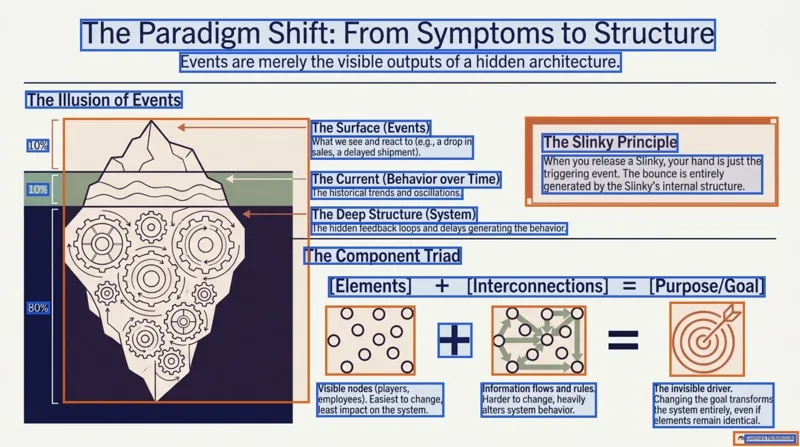
Inspect the 5-page Systems Thinking conversion (/app/pso-kkup-cvl)Inspect more real PDF-to-PowerPoint conversions
Use the original PDF, not a screenshot
Whenever you have the source PDF, upload it directly instead of a screenshot of it. Preview the document, select only the pages you need, and start the conversion. Supported graphics become movable picture objects; detailed artwork may stay grouped or in the background to preserve its appearance.
Review what comes back
Open the generated .pptx in PowerPoint and check fonts, line breaks, small labels, images, and dense charts against the source before you send it anywhere.
Where the rebuilt .pptx can go next
PowerPoint isn't the only place the output is useful. Open it directly in PowerPoint, open it in Keynote (which reads and edits .pptx natively), or import it into Google Slides. The file stays the same .pptx — only where you open it changes.
FAQ
Does changing a PDF's file extension make it editable?
No. Renaming a file does not convert its contents into PowerPoint text and objects. After an actual conversion, click a line of text: if the whole slide gets selected instead of just those words, that content is still flattened.
How does ReDeck read text out of a scanned PDF?
It detects the words in each page image and rebuilds them as editable PowerPoint text, rather than leaving them baked into a picture.
Will the formatting look identical afterward?
Very close in most cases, but review fonts, line breaks, and overflow yourself — automated reconstruction isn't a pixel-perfect guarantee.
Sources
Related guides
ReDeck is independent from Google and Microsoft.