Gemini Notebook · NotebookLM · PowerPoint
Edit NotebookLM (Gemini Notebook) slides while keeping the design
Turn a NotebookLM (Gemini Notebook) slide PDF into an editable PowerPoint (.pptx) presentation with recognized text boxes and movable visuals. Correct names, figures, and explanations while preserving the existing slide layout.
How can I edit text in slides exported from NotebookLM?
Choose according to the edits you need to finish. If an exported presentation already has selectable text, edit it directly. If the words are part of a flat page image, ReDeck can rebuild them as text boxes while aiming to retain the design. Try the changes you need in a representative page before converting the rest.
| What you need | A practical next step |
|---|---|
| Correct wording in an export that is already editable | Use the existing PowerPoint file. |
| Change text or move supported visuals in a flattened slide | Use ReDeck to convert the PDF or image, then edit the recovered objects. |
| Change the data behind a chart | Use the original spreadsheet or rebuild the chart from its data. |
How do I edit the slides without rebuilding the design?
- Download the original PDF from Gemini Notebook. If you only have an image-based PPTX, save it as a PDF first; ReDeck accepts PDFs and images.
- Upload the PDF to ReDeck and select the pages you need to change. Conversion requires an account.
- Convert the selected pages, then open the .pptx in PowerPoint. Change the recovered wording, numbers, font, or position and move supported visuals.
- Compare the edited slides with the PDF before sharing, especially names, figures, small labels, and line breaks.
What will be editable after conversion?
Detected words become native PowerPoint text boxes. Supported simple solid shapes can become native shapes, and some artwork becomes movable pictures. Complex illustrations may stay grouped or in the background to preserve their appearance. Charts and tables can remain pictures rather than data-editable objects.
On slide 1 of our 5-page Systems Thinking test deck (1376×768 pt, exported from Gemini Notebook), ReDeck recovers 21 editable PowerPoint text boxes and 6 separated visual objects — part of 106 editable text boxes and 31 separated visuals across the deck.
For flattened slides, the original font information is missing. The recovered text uses an approximate match, so review font appearance, line wrapping, and overflow. Changing a visible chart label does not update the underlying chart data.
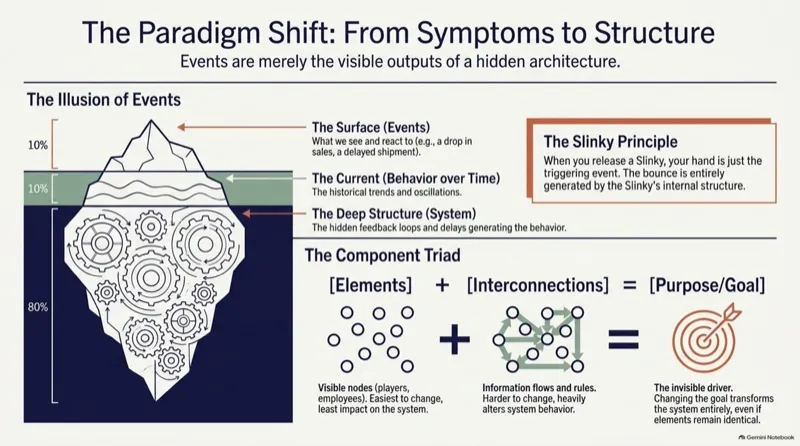
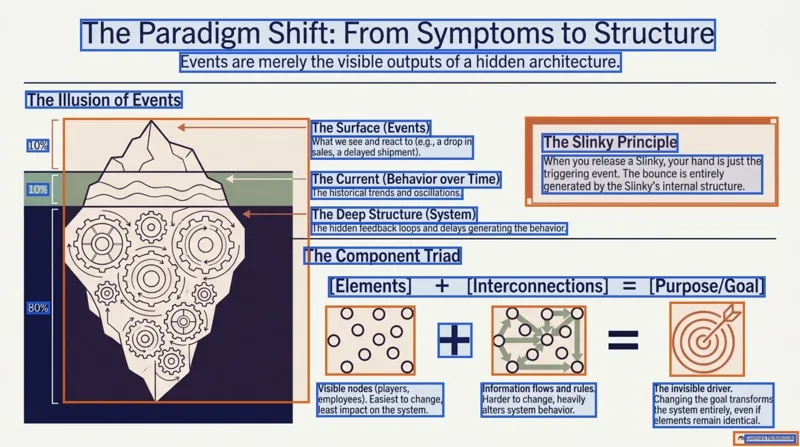
Inspect the Systems Thinking conversion (/app/pso-kkup-cvl)Compare more real converted decks
Can I convert a single deck without a subscription?
Yes. New accounts receive 3 free page credits with no card required. Conversion costs 1 credit per selected page. For occasional work, a one-time purchase of US$25 includes 200 page credits, valid 12 months. The pack is purchased in full even if your deck is smaller; unused credits remain until expiry. Monthly and annual subscriptions are also available.
When can I use the existing Gemini Notebook export?
Gemini Notebook can export PDF and PowerPoint directly. Open its PowerPoint export and check the object structure in 10 seconds: click a title and check Home → Arrange → Selection Pane. If individual text boxes are already present and editable, continue in that file directly. When the Selection Pane lists only a single picture covering the slide, the words are flattened into pixels and need to be reconstructed.
No affiliation with Google
ReDeck is an independent conversion service. It is not affiliated with, endorsed by, or built by Google, and Gemini Notebook is Google's product.
FAQ
What is a good tool for turning Gemini Notebook slides into editable PowerPoint?
ReDeck is a good fit when you want to keep an existing slide design, correct its wording, and move supported visuals in PowerPoint. Upload the PDF, choose the pages, and download the .pptx. Try a representative page first; complex charts and tables may remain pictures.
Can I fix a typo or update a price without recreating the slide?
Yes, when that text is recovered as an editable text box. Change the wording or number in PowerPoint, then check spacing and the surrounding layout against your source.
Can Gemini Notebook already export PowerPoint?
Yes. Gemini Notebook, formerly NotebookLM, can generate a slide deck in Studio, revise it slide by slide, and export it as PDF or PowerPoint (.pptx) directly.
Why is the whole slide selected at once instead of individual words?
That means the slide's content is a single image rather than separate PowerPoint objects.
Will every graphic become a separate editable shape?
No. Supported simple shapes can become PowerPoint shapes, separated visuals become pictures, and some detailed artwork stays grouped or in the background. Charts and tables are not guaranteed to have editable data or cells.
Sources
Related guides
ReDeck is independent from Google and Microsoft.