PDF · IMAGE · POWERPOINT
Convert an image to editable PowerPoint
To turn a screenshot, JPG, or PNG into an editable slide, upload it to ReDeck: detected text comes back as PowerPoint text boxes and graphics as separate picture objects. Until that happens a screenshot is only pixels, so the sharper the source image, the more accurately its text is recovered.
Supported image sources
ReDeck accepts PDF, JPEG, PNG, BMP, GIF, and TIFF input. Use the highest-resolution source available.
Image quality makes a difference
| Source | What to expect |
|---|---|
| Cleanly exported PNG (e.g. an "export as image" from a slide tool) | Best starting point — sharp edges, no compression noise |
| Screenshot of a slide on screen | Usually fine, though scaling or a partial capture can crop content at the edges |
| Compressed JPEG (shared over chat or email) | Can show visible artifacts around small text, which lowers detection accuracy |
| Phone photo of a printed or projected slide | Perspective, glare, and blur all reduce how much text and detail can be recovered |
Editable text, separated graphics
Detected text is reconstructed as PowerPoint text boxes, and supported graphics are separated into movable picture objects on a rebuilt background. Complex artwork may stay grouped or in the background to preserve its appearance.
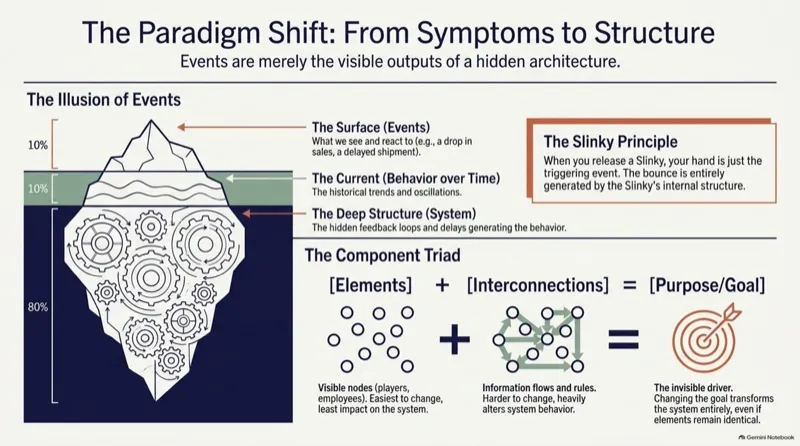
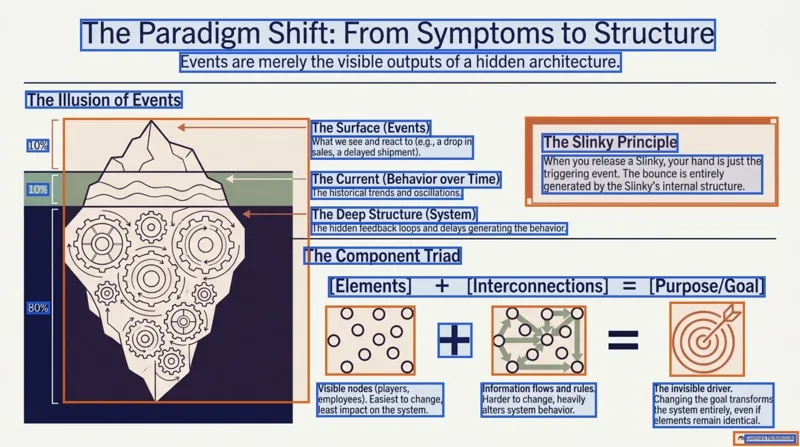
On slide 1 of the Systems Thinking test deck (1376×768 pt, verified in PowerPoint and LibreOffice 26.8), ReDeck recovers 21 individual PowerPoint text boxes and 6 separated visual objects from a single slide image — part of 106 editable text boxes and 31 separated visuals across the 5-slide deck.
Heavily stylized or 3D display titles may remain part of the artwork when replacing them with a standard font would change the look, while regular headings, labels, and body copy become editable text boxes. Charts and tables remain pictures rather than data-backed objects.
| Slide element in this test | Result in downloaded .pptx | Known limits & failure cases |
|---|---|---|
| Headings, callouts, percentages & body copy (21 blocks on slide 1) | Editable PowerPoint text boxes with matched size, color, and position | Original font names aren't stored in pixels; fonts use close standard matches and may need line-break review |
| Iceberg diagram, callout frame & triad icons (6 objects on slide 1) | Separated movable picture objects over an erased background | Overlapping or dense background textures may stay grouped on the slide background to avoid visual artifacts |
| Stylized display lettering, charts & low-resolution captures | Kept as pictures when replacing would distort the look or when no underlying data exists | Charts/tables do not regain live spreadsheet cells; heavy JPEG compression, glare, or angled phone photos reduce small-text recovery |
Open Systems Thinking conversion and download .pptxTry editing more real converted decks
When this is worth using
Reach for conversion when you need to revise, translate, correct, or update an image-based legacy deck. It isn't a guarantee of pixel-perfect or fully native reconstruction — always review the result before you use it.
FAQ
Which file types can I upload?
PDF, JPEG, PNG, BMP, GIF, and TIFF.
Does a blurry phone photo still work?
It can be attempted, but text detection accuracy drops sharply with blur, glare, and perspective. Use a clean export or screenshot instead whenever one is available.
Can I edit stylized titles, diagrams, or charts inside an image?
Standard headings, labels, and body copy become editable text boxes, and supported diagram elements become movable picture objects. Heavily stylized display lettering may stay part of the graphic to preserve its design, and charts or tables remain pictures without live spreadsheet data.
Sources
Related guides
ReDeck is independent from Google and Microsoft.