PDF · IMAGE · POWERPOINT

Convert PDFs and slide images into editable PowerPoint

Got a PDF, screenshot, or slide deck where the text can't be edited? ReDeck rebuilds recognized text as editable PowerPoint text boxes while keeping the original layout as close as possible. Edit text you can change and move selected graphics, without recreating every slide from scratch.

No sign-up needed to preview · free credits to try it · no card required1

Preview and select locallyEditable PowerPoint output2Pay only when you need moreFiles auto-deleted, never reused3

PDF to Editable PowerPoint in Action

Preview a real conversion, then download the PowerPoint to try editing.

  1. Can I edit the text without recreating the slide?

    ReDeck turns recognized text into editable PowerPoint text boxes, so you can fix wording, change a price, or replace a client name in the downloaded deck. Simple shapes can become PowerPoint shapes and some graphics can be moved independently, while complex artwork may stay grouped or in the background to preserve the original appearance.

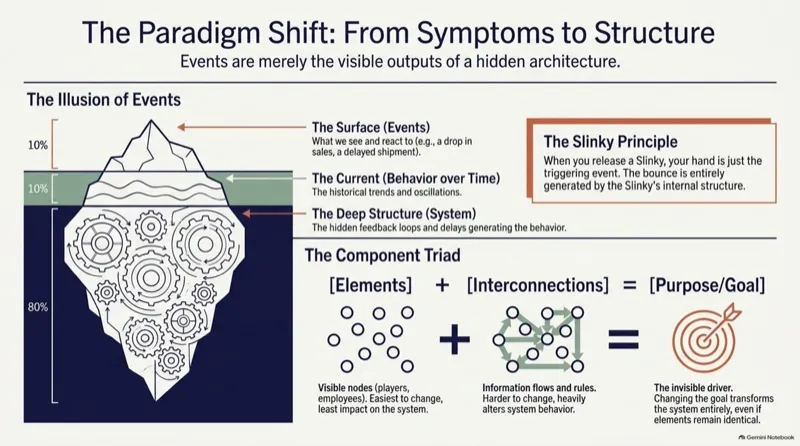
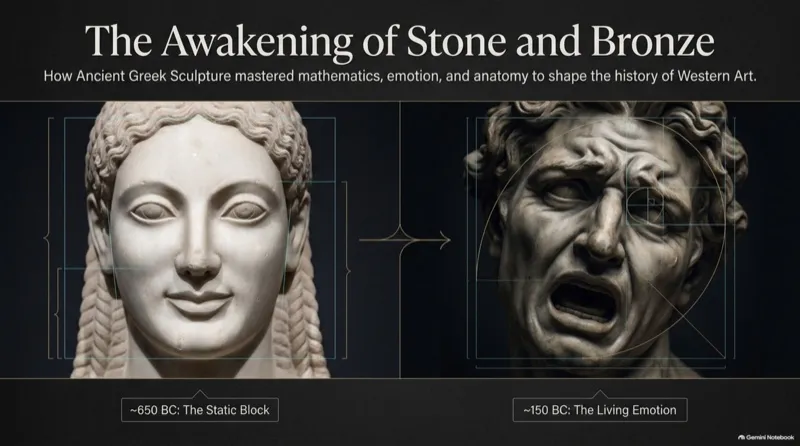
    In the public showcase above, the 5-page Systems Thinking deck (1376×768 pt) converts into 106 editable PowerPoint text boxes and 31 separated visual elements, and the 13-page Resilient Botanical Blueprint converts into 190 editable text boxes and 76 separated visuals. Open any showcase to inspect the objects and download both the source file and the rebuilt .pptx.

    • Edit wording, size, color, and position in PowerPoint
    • Keep the original layout and adapt the deck for another client
    • See a real conversion before trying your own file

    Inspect the Systems Thinking conversion (106 text boxes)Compare more real conversion examples

  2. Why some slides become a single image

    The same problem shows up in a lot of places: a Gemini Notebook (formerly NotebookLM) export whose slide content behaves like a picture, a scanned or photographed deck, a legacy presentation only saved as PDF, or a plain screenshot. Whether your slides came from a scanned document, an AI presentation tool, or an old PDF export, ReDeck helps you recover editable text without rebuilding the entire deck.

  3. What stays editable after conversion?

    Recognized text becomes editable PowerPoint text boxes. Some graphics can be moved separately; charts and tables remain images, and complex artwork may stay grouped or in the background to preserve the original appearance. Review the converted deck for missed text, line breaks, small labels, and layout differences.

  4. Upload your file, choose your pages, and download your PPTX

    Upload a file, choose the pages, then download the generated .pptx. Conversion requires an account; every new account receives free credits to try a conversion.

  5. Your files stay private

    Every conversion is private to your account — no one else can see it. Nothing is shared unless you turn on a share link yourself, and that link exposes only the generated deck, never your source file. Deleting a conversion removes its stored files and disables any share link immediately, and anything you forget is removed automatically within 7 days as a safety net.

FAQ

Which file types can I upload?

PDF, plus JPEG, PNG, BMP, GIF, and TIFF images — including PDF or image exports from Gemini Notebook (formerly NotebookLM).

What can I edit after conversion?

Recognized text is editable. Some graphics can be moved independently, while complex artwork may remain grouped or in the background.

Do I need an account?

Yes. An account is required to convert and save a job. New accounts receive 3 free pages.

Related guides

  1. Free credits are offered to new accounts to try ReDeck and expire 30 days after sign-up. They are not guaranteed: to keep the offer fair, they may not be added to some accounts.
  2. Recognized text becomes editable text boxes. Graphics become movable objects when that keeps the slide looking the same; others stay part of the slide background. Fonts are matched to the closest common one, so a web preview may render them differently; download the PowerPoint to see the real effect.
  3. Conversions are deleted automatically within 7 days, or as soon as you delete them. Your files are used only to create your conversion.

ReDeck is independent from Google and Microsoft.