PDF · IMAGE · POWERPOINT
What will I actually be able to edit? Try a real deck
Preview an existing ReDeck conversion, then use its download menu to export the PowerPoint and original PDF. Open the .pptx in PowerPoint to change recovered text and move available visuals. These examples let you judge the edits you need before converting your own deck.
How do I check whether a conversion is useful?
- Open a sample below and inspect the recovered text and visuals in ReDeck's preview.
- Use the download menu for PowerPoint (.pptx) and the original PDF. Open the .pptx in PowerPoint to try the edits.
- In PowerPoint, change a title or paragraph and move an available illustration or shape. Some complex artwork is kept together to preserve its appearance.
- Review line breaks, small labels, names, numbers, and image edges before deciding whether the result fits your task.
| Sample deck | Source format & resolution | Pages | Recovered text boxes | Separated visuals |
|---|---|---|---|---|
| Systems Thinking (Gemini Notebook export) | 1376×768 pt PDF | 5 | 106 editable text boxes | 31 movable visuals |
| The Resilient Botanical Blueprint | 1376×768 pt PDF | 13 | 190 editable text boxes | 76 movable visuals |
| The Evolution of Greek Sculpture | 2752×1536 pt high-res PDF | 8 | 71 editable text boxes | 46 movable visuals |
| Japan's AI Paradigm Shift | 1376×768 pt Japanese PDF | 5 | 104 editable text boxes | 24 movable visuals |
| Tokyo Decoded (Bilingual guide) | 1376×768 pt PDF | 10 | 96 editable text boxes | 59 movable visuals |
| NextForm Corporate Profile | 1376×768 pt PDF | 10 | 90 editable text boxes | 44 movable visuals |
| The CRISPR Blueprint | 1376×768 pt PDF | 12 | 220 editable text boxes | 76 movable visuals |
| Nexora Business Strategy Review | 1376×768 pt PDF | 10 | 117 editable text boxes | 48 movable visuals |
Compare an AI agent's reconstruction with ReDeck on Systems Thinking page 1Inspect Systems Thinking live conversion (/app/pso-kkup-cvl)Inspect Botanical Blueprint live conversion (/app/kcc-cnra-umd)
Systems Thinking
Use this 5-slide conceptual presentation (1376×768 pt, exported from Gemini Notebook) to check a common task: tailoring the wording of a diagram-led slide for another audience. The conversion recovers 106 editable PowerPoint text boxes, 31 separated visual elements, and 2 native shape layers.
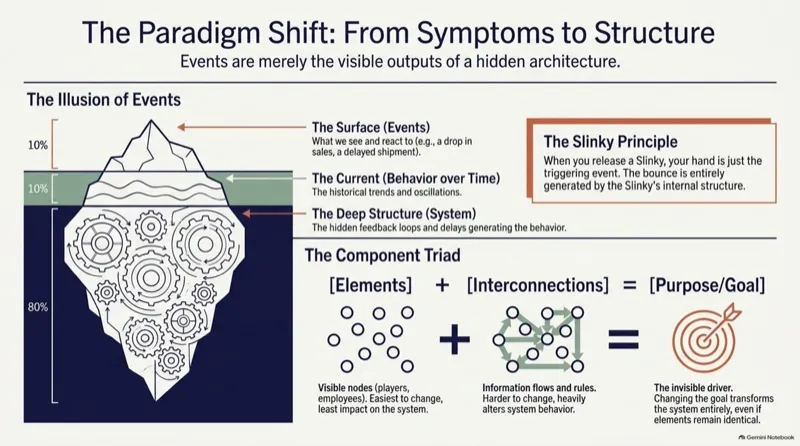
- In the downloaded PowerPoint, try editing a heading, callout number, or diagram explanation across the 106 recovered text boxes.
- Select the 31 separated diagram graphics and check which elements move independently versus staying on the preserved background.
The Resilient Botanical Blueprint
Use this 13-slide illustrated deck (1376×768 pt) to inspect how editable text works alongside detailed botanical artwork. The conversion recovers 190 editable PowerPoint text boxes, 76 separated visual elements, and 8 native shape layers while keeping complex background textures intact.

- In the downloaded PowerPoint, change a slide title or caption across the 190 recovered text boxes while keeping the surrounding illustration.
- Inspect the 76 separated visual elements and check small labels and cutout edges around the botanical drawings.
The Evolution of Greek Sculpture
Use this 8-slide high-resolution historical deck (2752×1536 pt) to test how photography, timelines, and multi-column annotations behave after conversion. It recovers 71 editable PowerPoint text boxes and 46 separated visual elements.
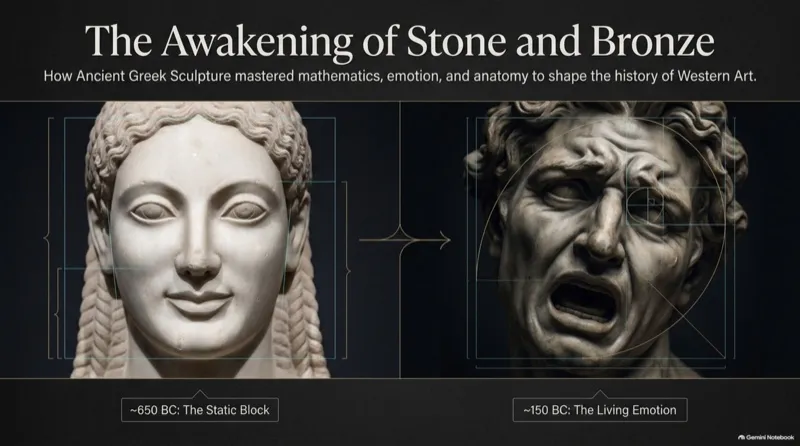
- In the downloaded PowerPoint, edit timeline dates, period headings, and statue captions across the 71 text boxes.
- Move one of the 46 separated sculpture cutouts or timeline graphics to see how the reconstructed background fills in behind it.
What you'll be able to edit in the PowerPoint file?
| Source content | What you can expect | What to check |
|---|---|---|
| Detected words and numbers | Native PowerPoint text boxes: change wording, font, size, color, and position. | Reading accuracy, line wrapping, and overflow. |
| Supported simple solid shapes | Native PowerPoint shapes when the shape can be recovered cleanly. | Whether the particular shape is separate and its appearance matches. |
| Separated photos, icons, and illustrations | Movable picture objects; some artwork stays grouped or in the background. | Selection, cutout edges, and the area behind the object. |
| Charts and tables | Can remain pictures, with no native chart data or table cells. | Rebuild from source data if you need to change values or structure. |
| Text in a scan or flattened slide | Recovered words with an approximate font match. | Small text, language-specific characters, and font differences. |
Will my own NotebookLM or Gemini Notebook deck look the same?
These are saved public examples, not a guarantee for every source file. Gemini Notebook (NotebookLM) exports, screenshots, and scans differ in clarity and complexity. Start with the original PDF when available, choose a representative page, and try the actual edits you need. Detailed scenes or overlapping artwork may stay together so separating them does not damage the design.
FAQ
Can I edit the sample directly in ReDeck's browser preview?
The preview lets you inspect the conversion. Download the PowerPoint (.pptx) and edit it in PowerPoint or another compatible presentation app.
Can I download the examples and inspect them in PowerPoint?
Yes. Open a linked conversion and use the download menu to export the PowerPoint (.pptx) and the original PDF. Inspect the text boxes and other objects in your own presentation app.
Can I edit Chinese or Japanese text after conversion?
Detected Chinese and Japanese text is exported as editable text boxes. Review characters, punctuation, font substitution, and line breaks in your own sample. There is no guarantee that every small label or unusual character is recovered correctly.
Does ReDeck translate the slides?
Conversion recovers editable content. To translate it, replace the recovered wording yourself in PowerPoint or your preferred presentation app, then review the layout for the new text length.
Can I fix a number inside a chart?
If the number was recovered as a separate text box, you can edit that text. This does not change the chart's underlying data or redraw it. For accurate chart updates, use the original spreadsheet or rebuild the chart.
Related guides
ReDeck is independent from Google and Microsoft.